 Old Habits
Switcher · on Windows: Alt + Tab
Alt+Tab on Mac, window by window.
On a Mac, ⌘Tab switches apps and brings all of their windows along. The Old Habits Switcher gives you Windows Alt+Tab back: one entry per window, with a thumbnail, in the same spot on the keyboard.
Why Mac ⌘Tab isn’t Alt+Tab
Switcher
On Windows, Alt+Tab shows every open window. On macOS, ⌘Tab shows apps: picking Safari brings every Safari window forward at once. To reach one specific window of the same app, you need another shortcut (⌘ and the grave accent key) or Mission Control.
After years on Windows, it’s the gesture that betrays muscle memory the most: you press, you let go, and the window that shows up isn’t the one you wanted.
The Switcher changes that. On a Mac keyboard, ⌘ sits where Alt was on a PC keyboard — your thumb makes the same move, and the result is the Windows one again.
How it works in Old Habits
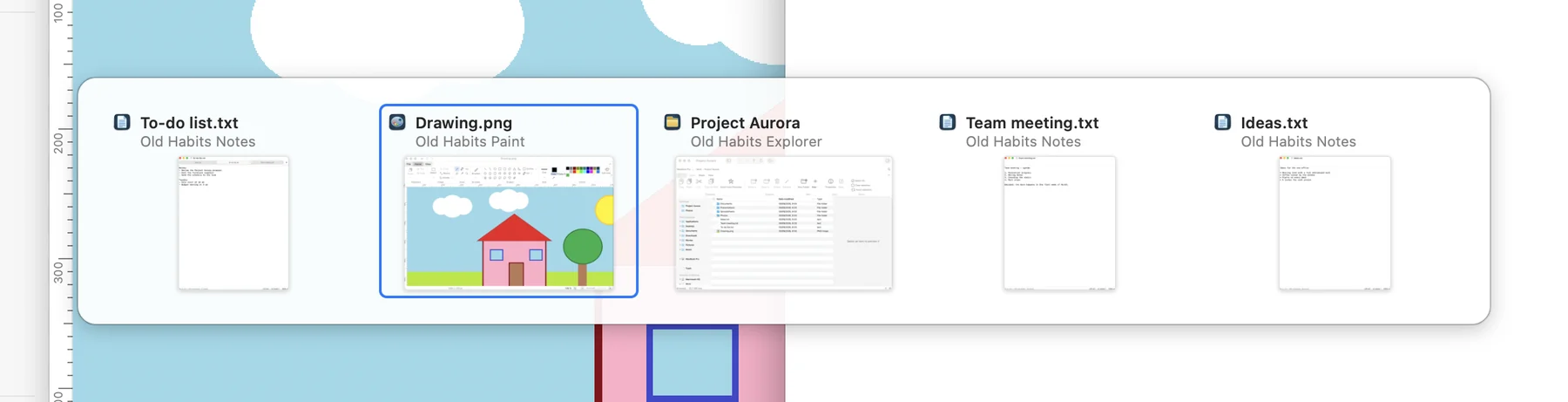
Alt+Tab window switching. On a Mac keyboard, ⌘ sits exactly where Alt was on a PC keyboard — that’s why the shortcut is ⌘Tab.
- One entry per window, with a thumbnail. Two Safari windows are two entries.
- ⌥Tab switches between apps, for when you want the old Mac behavior. You can turn it off and give ⌥Tab back to the system.
- Releasing the key confirms; Esc cancels; click and hover work too.
- Buttons on thumbnails to close, minimize, maximize and quit the app.
- Include minimized windows and windows of hidden apps, or not; adjustable thumbnail size.
- Windows on another desktop get an other space badge; a Snap group shows up as a single entry.
- All four combinations can be re-recorded.
| Key | What it does |
|---|---|
| ⌘Tab ⌘⇧Tab | Next and previous window |
| ⌥Tab ⌥⇧Tab | Next and previous app |
| Esc | Cancel |
If the Switcher ever delays your keyboard, it turns itself off so typing never stalls.
See all features →Frequently asked questions
What about switching between apps?
It moves to ⌥Tab, for when you want the old Mac behavior. If you don’t, turn that option off and ⌥Tab goes back to the system.
Can I change the shortcut?
Yes. All four combinations — ⌘Tab, ⌘⇧Tab, ⌥Tab and ⌥⇧Tab — can be re-recorded in the preferences.
Does it show window thumbnails?
Yes, with macOS’s Screen Recording permission, which is optional. Without it, each entry shows the window’s icon and title.
What about minimized windows or windows on another desktop?
You choose whether minimized windows and windows of hidden apps are listed. Windows on another desktop get an other space badge, and a Snap group shows up as a single entry.
Which Macs does it run on?
Macs with Apple silicon (M1 or newer) and macOS 26 or later. Intel Macs aren’t supported.
The other tools
Old Habits brings seven tools together, each with its own switch: turn on only what you miss.
- Window snapping on Mac — Snap
- File Explorer for Mac — Old Habits Explorer
- Paint for Mac — Old Habits Paint
- Notepad for Mac — Old Habits Notes
- Clipboard history on Mac — Clipboard
- Window previews in the Dock — Dock thumbnails
Try it first. Buy it once.
Try it free for 14 days with the form on the home page. Like it? One-time purchase, no subscription, directly on this site: Individual for 1 Mac or Multi for up to 3 Macs. The price, with your country’s sales taxes (in Brazil, plus IOF), is shown in the checkout window.