 Old Habits
Clipboard · on Windows: Win + V
Win+V clipboard history, on the Mac.
⌃⌥V opens a panel with what you copied: text, web addresses, images and files. Pick by number, pin what you use all the time, paste as plain text.
There’s no Win+V on the Mac
Clipboard
On Windows, Win+V opens the list of what you copied before, right where you’re typing. On the Mac, ⌘V pastes the last thing you copied — and the shortcut your hand reaches for isn’t there.
Old Habits puts the panel on ⌃⌥V, with the Windows behavior: numbers to pick, pinned items, paste as plain text. And the history lives in memory only: it never goes to disk.
How it works in Old Habits
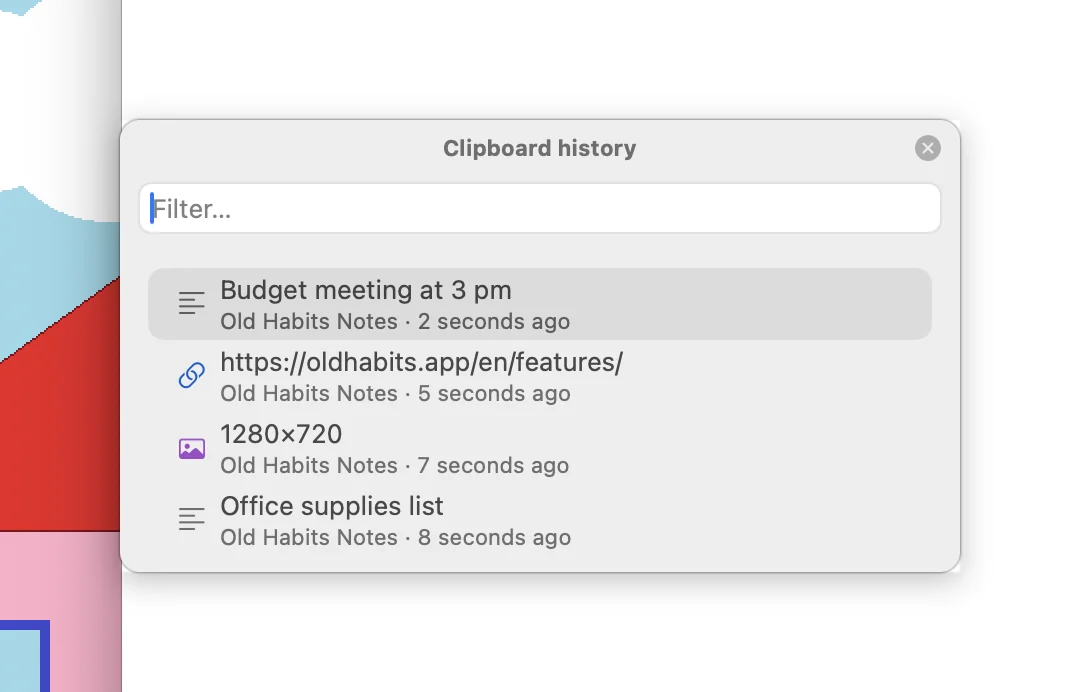
The Win+V clipboard history.
- ⌃⌥V opens the panel with what you copied: text, web addresses, images and files.
- Keys 1 to 9 pick an item; ↩ uses the selected one; ⌫ removes it. Filter by text and by type.
- Pin, Paste as plain text and Show source folder.
- Choose what double-click does: paste directly (default), copy, or copy as plain text.
- Drag a copied image from the history into a folder and it becomes a PNG or JPEG file; a copied image file goes as the file itself, with its original extension.
- Keep for 5 min, 15 min, 1 h, 3 h, 24 h or until you quit.
Privacy
- History lives in memory only: it never goes to disk or to logs.
- Whatever password managers mark as concealed is ignored.
- Ignored apps: what you copy in them stays out.
- Clear when the screen locks, Ignore items copied on another device and Clear now.
Frequently asked questions
Does it keep my passwords?
No. Whatever password managers mark as concealed is ignored, and you can list apps whose copies never get in.
Is the history saved to disk?
No. It lives in memory only — never on disk or in logs — and lasts as long as you choose: 5 min, 15 min, 1 h, 3 h, 24 h or until you quit. It can also clear when the screen locks.
Does it copy images and files?
Yes. Drag a copied image from the history into a folder and it becomes a PNG or JPEG file; a copied image file goes as the file itself, with its original extension.
Can I paste without formatting?
Yes: Paste as plain text. You also choose what double-click does — paste directly, copy, or copy as plain text.
Which Macs does it run on?
Macs with Apple silicon (M1 or newer) and macOS 26 or later. Intel Macs aren’t supported.
The other tools
Old Habits brings seven tools together, each with its own switch: turn on only what you miss.
- Alt+Tab on Mac — Switcher
- Window snapping on Mac — Snap
- File Explorer for Mac — Old Habits Explorer
- Paint for Mac — Old Habits Paint
- Notepad for Mac — Old Habits Notes
- Window previews in the Dock — Dock thumbnails
Try it first. Buy it once.
Try it free for 14 days with the form on the home page. Like it? One-time purchase, no subscription, directly on this site: Individual for 1 Mac or Multi for up to 3 Macs. The price, with your country’s sales taxes (in Brazil, plus IOF), is shown in the checkout window.