 Old Habits
 Paint · on Windows: Paint
An image editor that works like Paint, on the Mac.
Old Habits Paint has the Ribbon from Paint on Windows 10 and 11: the palette, the brushes and the shapes right where you expect them. It opens and saves PNG, JPEG and BMP.
The Mac doesn’t come with a Paint
Old Habits Paint
macOS doesn’t include a simple drawing editor. Preview marks up images — arrows, boxes, text, a freehand stroke — but it isn’t a paint program: no fill bucket, no brushes, no palette with Color 1 and Color 2, and no Ribbon your hands already know.
Old Habits Paint is that program. It does the crop, the arrow and the drawing you used to do in Paint, and saves in the usual formats.
How it works in Old Habits
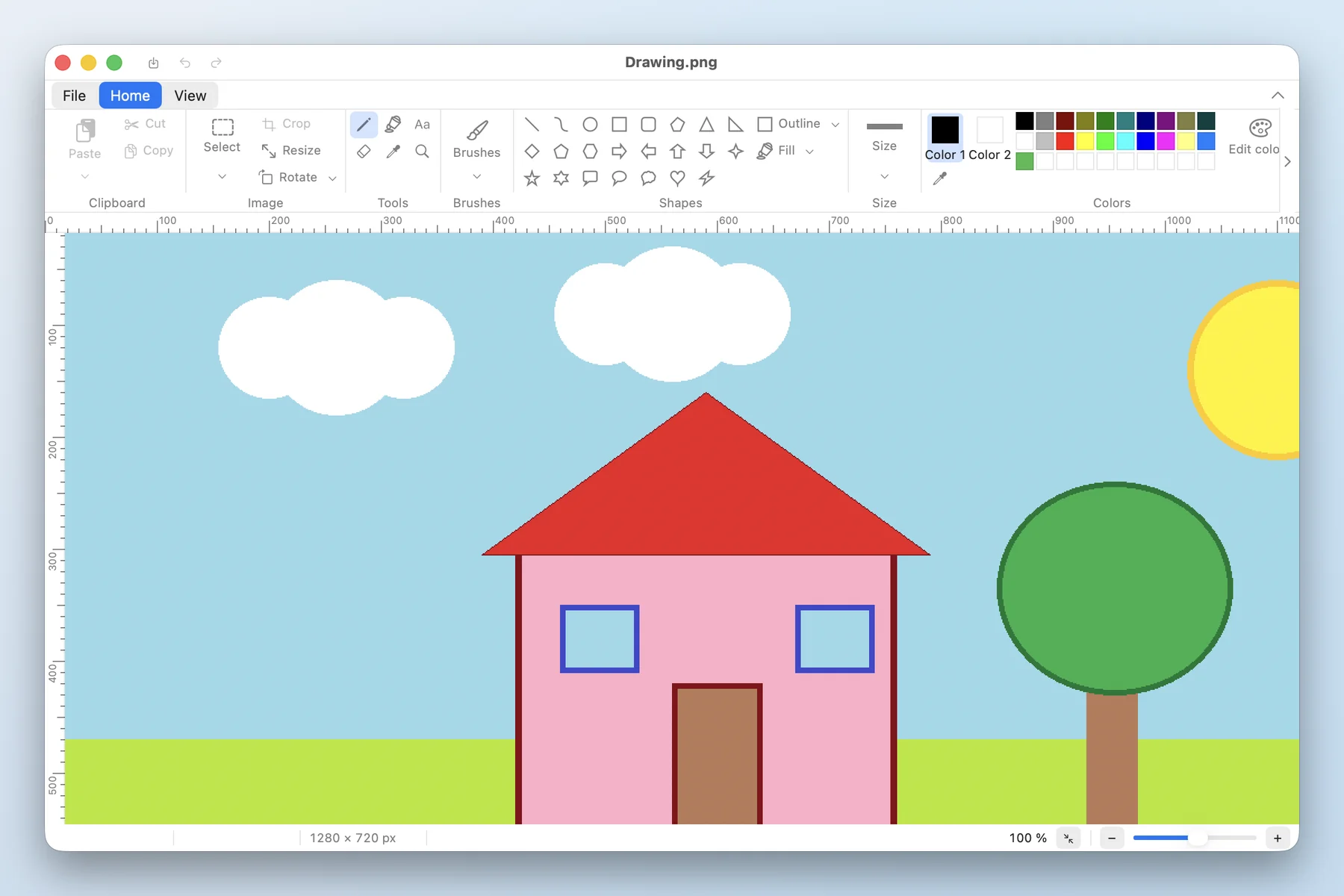
A simple image editor with the Ribbon of Paint on Windows 10 and 11.
Tools
- Rectangular, free-form and transparent selection; select all and invert selection.
- Pencil, eraser, fill, color picker, magnifier and text with font, bold, italic, underline and opaque or transparent background.
- Brushes: brush, two calligraphy brushes, airbrush, oil brush, crayon, marker, natural pencil and watercolor.
- 23 shapes — line, curve, polygons, arrows, stars, callouts, heart, lightning — with solid or textured outline and fill.
Colors and image
- Color 1 and Color 2, palette and Edit colors by hue, saturation, luminance or RGB. Custom colors are remembered.
- Crop, Resize Image, Resize canvas, rotate 90° and 180°, flip horizontally and vertically.
- Rulers, gridlines, full screen and zoom.
Files
- Saves as PNG, JPEG and BMP. Also opens TIFF, GIF and HEIC.
- Paste from file, import, print and print preview.
- Up to 200 undo levels (50 by default).
- Can become the default app for PNG, JPEG and BMP — and stop being it, in one click.
Shortcuts
| Key | What it does |
|---|---|
| ⌃Z ⌃Y | Undo and redo |
| ⌃W | Resize image |
| ⌃E | Image properties |
| PageUp PageDown | Zoom in and out |
Frequently asked questions
Which formats does it open and save?
It saves PNG, JPEG and BMP. It also opens TIFF, GIF and HEIC.
Can it be the default app for images?
Yes, for PNG, JPEG and BMP — and it stops being one with a click.
Does it have undo?
Up to 200 levels (50 by default), with ⌃Z and ⌃Y, like on Windows.
Can I resize and crop?
Yes: Crop, Resize Image (⌃W), Resize canvas, rotate 90° and 180° and flip horizontally and vertically.
Which Macs does it run on?
Macs with Apple silicon (M1 or newer) and macOS 26 or later. Intel Macs aren’t supported.
The other tools
Old Habits brings seven tools together, each with its own switch: turn on only what you miss.
- Alt+Tab on Mac — Switcher
- Window snapping on Mac — Snap
- File Explorer for Mac — Old Habits Explorer
- Notepad for Mac — Old Habits Notes
- Clipboard history on Mac — Clipboard
- Window previews in the Dock — Dock thumbnails
Try it first. Buy it once.
Try it free for 14 days with the form on the home page. Like it? One-time purchase, no subscription, directly on this site: Individual for 1 Mac or Multi for up to 3 Macs. The price, with your country’s sales taxes (in Brazil, plus IOF), is shown in the checkout window.